

AI & Software → AI Productivity
The best AI productivity tools for desktop and browser workflows are the ones that match where your work actually happens. That sounds basic. It is also the part people skip.
If your day mostly happens across apps, files, shortcuts, and commands, the best tool will usually look very different from the one that makes sense for someone living in Chrome tabs, web docs, PDFs, and ChatGPT threads. This is why “best AI productivity tool” is too broad to be useful on its own.
Table of Contents
This page narrows the decision to four mapped brands that fit this desktop/browser lane in different ways: Raycast, Merlin AI, Sider AI, and Superpower. The real comparison is not just brand vs brand. It is desktop-first vs browser-first vs ChatGPT-first vs hybrid.
For the broader shortlist first, go to Best AI Productivity Tools. For the tighter framework behind this decision, use How to Choose an AI Productivity Tool. And for the narrower three-way comparison, read Raycast vs Merlin AI vs Sider AI.
Quick picks
- Best for desktop-first work: Raycast
- Best for browser-first convenience: Merlin AI
- Best for browser research with saved context: Sider AI
- Best for ChatGPT-heavy browser organization: Superpower
The short version: choose Raycast if the bottleneck is moving across apps and commands, choose Merlin if the bottleneck is fast browser-side help, choose Sider if browsing also needs memory and reuse, and choose Superpower if your real browser workflow already revolves around ChatGPT and needs structure more than another assistant layer.
What desktop and browser workflow tools are actually for
This category looks unified from a distance. In practice, it splits into four jobs:
- Desktop execution: launching, switching, searching, triggering commands, and moving across local workflow faster.
- Browser assistance: summarizing pages, asking questions about a website or PDF, and reducing research drag while browsing.
- Saved browser research: keeping useful findings, clips, and source-backed notes so the work is reusable later.
- ChatGPT workflow organization: turning a chaotic browser-based AI habit into something structured enough to use repeatedly.

The important part is that these are not the same decision. A launcher is not a browser side panel. A browser side panel is not a ChatGPT organizer. A browser organizer is not the same as a research knowledge base. They can overlap. They still do different jobs.
The better question is not “which one has the most features?” It is “where do I lose the most time right now: in apps, in tabs, in research memory, or inside messy AI chats?”
How to choose by environment first
This is the cleaner way to narrow the shortlist before comparing brands.
- Choose desktop-first if most of your work happens across apps, commands, local files, snippets, and shortcuts.
- Choose browser-first if most of your work happens inside tabs, search results, articles, PDFs, and websites.
- Choose research-first browser tools if you want more than quick summaries and need saved context, clips, and source-backed recall.
- Choose ChatGPT-first organization tools if your browser workflow already lives inside ChatGPT and the real issue is retrieval, prompt reuse, and conversation management.
This sounds good on paper, but it matters more after the first week. A lot of tools look useful in isolation. Fewer of them fit the place where the friction actually happens.
That is why desktop people often overbuy browser assistants, while browser-heavy users often underuse launcher tools. The strongest case for each product is narrower than the category label suggests. That is not a weakness. It is usually the reason the tool is useful.

Best AI productivity tools for desktop and browser workflows by fit
These are the four mapped picks I would shortlist first, with the fit kept practical instead of flattened.
1). Raycast — best for desktop-first speed and control
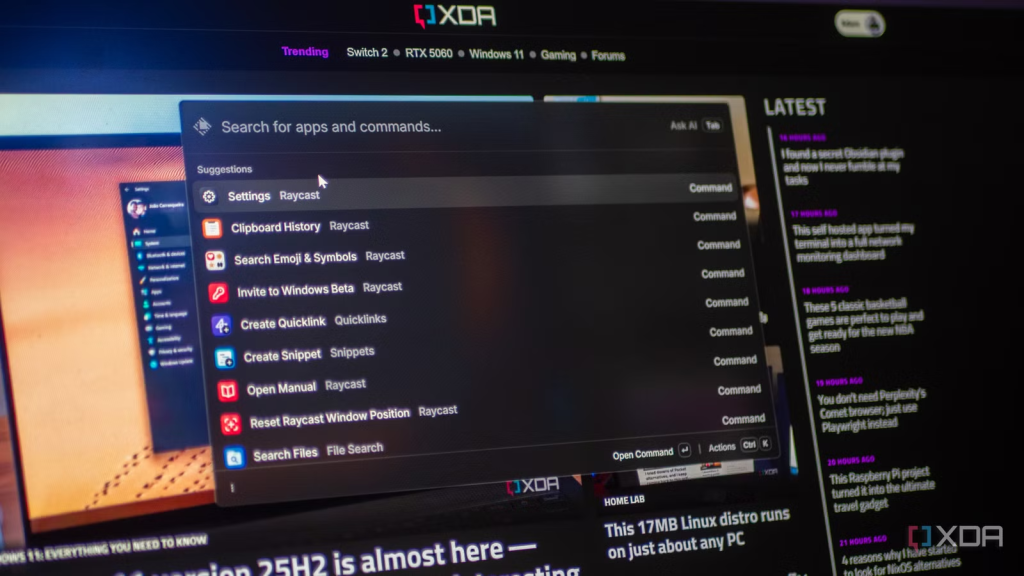
Raycast is the cleanest fit when your workflow is app-heavy, keyboard-heavy, and desktop-heavy. It is built around the launcher, which means the value shows up in movement: opening apps, running commands, searching, switching context, and layering AI into the OS rather than into a browser tab.
Best for: operators, product people, developers, writers, and heavy keyboard users who want a faster control layer across desktop work.
Why it stands out: it does not feel like “yet another AI window.” It feels like a workflow shell. That difference matters. A lot of browser tools can answer questions. Fewer tools make the desktop itself feel tighter.
Who should skip it: people whose work is mostly tab-based and who do not naturally use launcher-style tools. Raycast is excellent when it fits. It is easy to overvalue when the work mostly happens in Chrome.
The real value here is less dramatic than the pitch but more practical when it clicks. If your week is full of micro-friction across apps, Raycast can earn its place fast. If your week is mostly reading websites, it may feel a little indirect.
2) Merlin AI — best for browser-first convenience
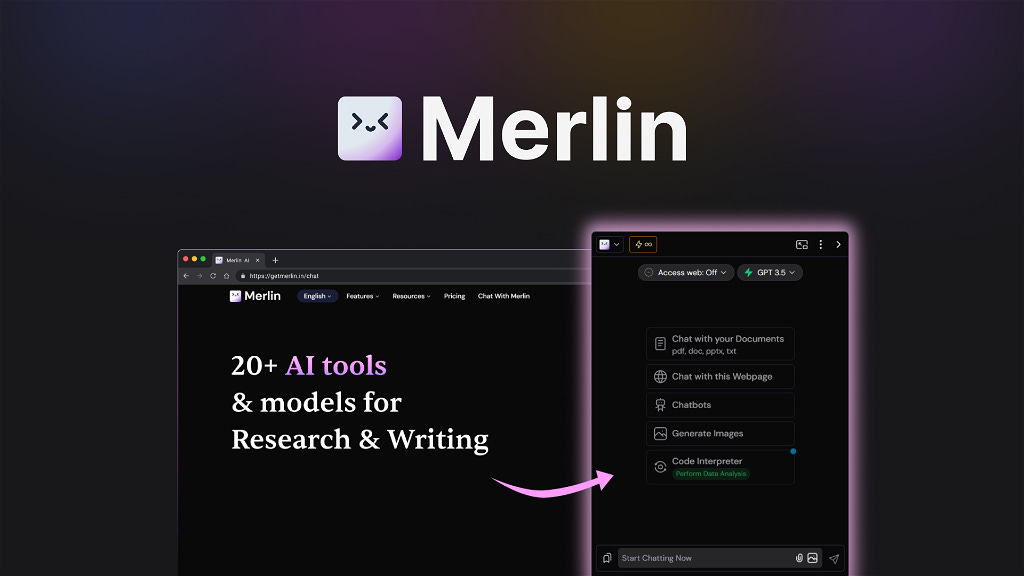
Merlin AI makes the strongest case when your work is mostly in the browser and you want broad AI help without rebuilding your workflow. It is useful for summarizing websites, articles, PDFs, and docs, asking questions about the page, and handling quick drafting or search-side tasks in one layer.
Best for: people who live in tabs and want a flexible browser-side helper that starts being useful quickly.
Why it stands out: low setup friction. Merlin is one of those tools that can help right away because it works where browsing already happens. For many users, that early usefulness is the whole point.
Who should skip it: people who want a more structured research memory or a stronger desktop shell. Merlin is broad, convenient, and often the easiest recommendation for browser-heavy users. It is not the most opinionated system in this group.
This is one of those tools that can sound broader than it feels. That is not necessarily bad. For some users, broad and light is exactly the fit.
3) Sider AI — best for browser research with reusable context
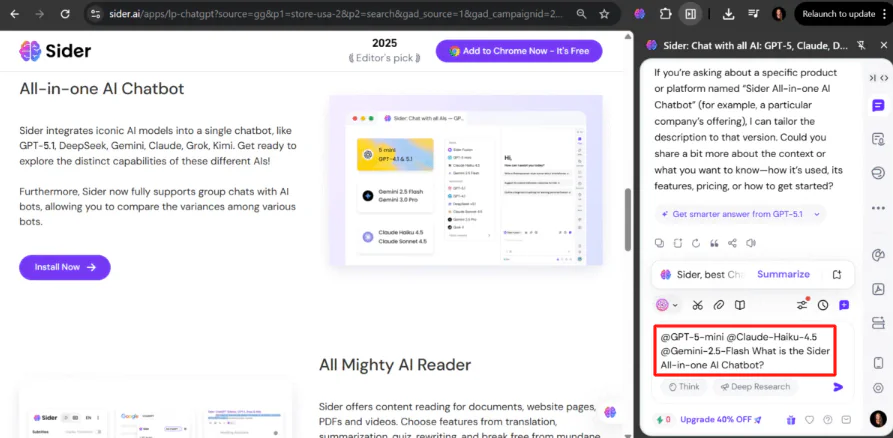
Sider AI overlaps with Merlin at first glance, but the stronger case is slightly different. Sider is better when your browser workflow needs to become something reusable. The side panel helps with summaries, explanations, comparisons, and deep reading, but Wisebase is where it starts to pull away. That layer turns browsing into saved research rather than a series of disposable prompts.
Best for: analysts, researchers, knowledge workers, and browser-heavy users who want more memory and structure inside browsing.
Why it stands out: the browser help does not have to vanish after the tab closes. That matters more than it sounds. A lot of AI browsing tools are useful in the moment and forgettable later. Sider is stronger when you want browsing to accumulate into knowledge.
Who should skip it: people who simply want the lightest possible browser helper and do not care about clips, saved sources, or a growing research library.
If your decision is really between the main browser-and-desktop lane, this is the more direct follow-up: Raycast vs Merlin AI vs Sider AI.
4) Superpower — best for ChatGPT-centric browser workflows
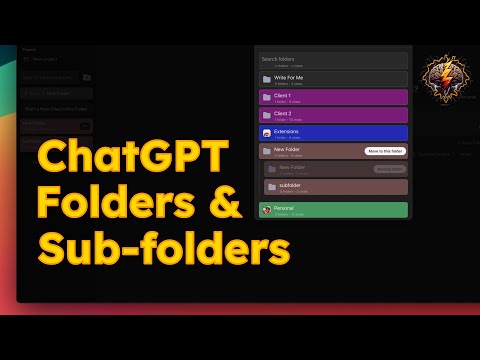
Superpower is the most different tool in this list, which is exactly why it belongs here. It is not trying to be another broad browser AI assistant. It is more useful when your browser workflow already revolves around ChatGPT and the real pain is organization: folders, subfolders, prompt management, prompt reuse, chat notes, exports, searchability, and cleaner retrieval.
Best for: people who already do a lot of work in ChatGPT and need structure around conversations, prompts, and browsing-side AI workflow hygiene.
Why it stands out: it attacks a different bottleneck. Not research generation. Not side-panel assistance. Not desktop control. Just the messy reality that many people now do real work inside ChatGPT and quickly lose track of prompts, threads, and reference material.
Who should skip it: people who are not already ChatGPT-heavy. Superpower makes more sense when ChatGPT is already part of the operating environment. If it is not, this may feel like solving a problem you do not have yet.
I would not call this the broadest pick. I would call it one of the more honest ones. It helps when the browser workflow is already centered on ChatGPT and your friction is disorder, not lack of AI.
The hybrid path: when you need desktop and browser help together
This is where the category gets more interesting. Some people do not need one winner. They need the right pairing.
- Raycast + Merlin AI makes sense when you want desktop speed plus broad browser-side help.
- Raycast + Sider AI makes sense when you want desktop speed plus browser research that stays reusable.
- Raycast + Superpower makes sense when desktop work and ChatGPT-heavy workflows both matter and the real pain is context switching plus AI clutter.
The mistake many people make is assuming one tool should cover all of that equally well. Usually it should not. A narrow, clean pair often works better than a single tool stretched across jobs it was never meant to own.
That is also where the buying decision becomes calmer. Instead of asking one tool to be launcher, browser assistant, research memory, and ChatGPT organizer at the same time, you can choose one primary layer and one support layer only if the pain justifies it.
Who should skip these tools, or at least buy more slowly
- Skip or slow down if you still cannot tell whether your work is mainly desktop-first or browser-first.
- Skip or slow down if your actual bottleneck is email, meetings, or team coordination rather than apps and tabs.
- Skip or slow down if you are mostly attracted to AI convenience instead of a repeated workflow drag.
- Skip or slow down if you want one tool to solve launcher speed, website summaries, saved research, and ChatGPT organization equally well.
I would not call that a reason to avoid the category. I would call it a reason to narrow the lane first. The tools here get more useful as the workflow becomes more specific.
Practical limitations to keep in mind
- Desktop tools can feel indirect if almost everything you do happens in the browser.
- Browser assistants can feel broad but shallow if your real need is saved context or stronger workflow structure.
- Research-oriented browser tools can be overkill if you only want fast summaries and lightweight help.
- ChatGPT organizers only make sense when ChatGPT is already a serious part of your workflow.
The better question is not “which one does the most?” It is “which one removes the most repeated friction in the place I already work?” That is where these tools stop sounding impressive and start being useful.
Fit summary: where I would start
- Start with Raycast if your week is slowed down by desktop friction.
- Start with Merlin AI if your week is slowed down by browser-side reading and quick synthesis.
- Start with Sider AI if your week is slowed down by browser research you keep redoing.
- Start with Superpower if your week is slowed down by messy ChatGPT organization and prompt sprawl.
The honest version is that there is no single universal winner here. There is only the right layer for the place where your workflow actually lives.
Best next step
Start with the environment, not the brand. If your work is desktop-first, Raycast is the clearer lane. If it is browser-first, Merlin or Sider will usually make more sense. If your browser work already revolves around ChatGPT, Superpower is the cleaner specialist fit.
FAQ
What is the best AI productivity tool for desktop workflows?
Raycast is the clearest fit when the work is desktop-first. It makes the most sense when your bottleneck is switching, launching, searching, and acting across apps and commands.
What is the best AI productivity tool for browser workflows?
That depends on the type of browser work. Merlin is the easier fit for broad browser convenience. Sider is the stronger fit when you also want saved research, clips, and reusable context.
When should I choose Sider instead of Merlin?
Choose Sider when browser help needs to become a knowledge workflow. If you want saved research, Wisebase-style reuse, and more structured context, Sider makes more sense than a lighter general helper.
Is Superpower an AI assistant like Merlin or Sider?
Not really in the same way. Superpower is more useful as a ChatGPT workflow organizer. It helps when the real issue is managing prompts, folders, conversations, and retrieval inside a ChatGPT-heavy browser workflow.
Can one tool handle both desktop and browser workflows well?
Sometimes partly, but usually not equally well. Most users get better results by choosing the primary environment first and then only adding a second layer if the repeated friction clearly justifies it.
Should I start with one tool or combine two?
Start with one unless the need is already obvious on both sides. A clean single fit is usually better than stacking tools too early and creating another layer of workflow overhead.