

AI & Software → AI Productivity
The best AI tools for email and inbox productivity are the ones that reduce triage, speed up follow-up, and keep important conversations from getting buried. That sounds simple. In practice, the category splits into three very different jobs.
If you are searching for best AI tools for email and inbox productivity, the real problem is usually one of these: your inbox is full of low-value email that still needs sorting, your follow-up process is scattered across Gmail and spreadsheets, or your team spends too much time on outreach-heavy email work that should be more structured.
This is why broad “AI email tools” lists often feel a little off. They mix true inbox assistants with CRM workflows and outreach platforms as if they all solve the same pain. They do not. This guide keeps that distinction clear, so you can choose by workflow instead of by vague convenience.
For the broader cluster map, start with the AI Productivity hub. For the wider shortlist first, go to Best AI Productivity Tools. And for the deeper framework behind this page, read How to Choose an AI Productivity Tool.
Quick picks
- Best overall for inbox cleanup: Inbox Zero
- Best for Gmail-based follow-up and pipeline-heavy inbox work: NetHunt CRM
- Best niche pick for outreach-email workflows: ConvertMate
The short version: choose Inbox Zero if the pain is triage and response overhead, choose NetHunt CRM if your inbox is really part of a sales or relationship workflow, and choose ConvertMate only if your email productivity problem is outreach execution tied to SEO and AI visibility.

What email and inbox productivity tools are actually for
There are three distinct problems hiding inside this category.
- Inbox triage: sorting, labeling, prioritizing, blocking noise, and drafting replies faster.
- Relationship follow-up: keeping contacts, deals, tasks, reminders, and email history together inside an email-driven workflow.
- Outreach execution: sending and managing structured outbound email campaigns tied to a bigger business goal.
The mistake many people make is treating these as one thing. They are not. An inbox assistant is built to reduce day-to-day email drag. A Gmail-based CRM is built to keep follow-up tied to contacts, deals, and pipeline logic. An outreach platform is built to run campaign-style email work.
This sounds like a technical distinction, but it changes the buying decision completely. If you choose the wrong layer, even a good tool will feel underwhelming. That is usually where inbox software goes wrong. Not because the product is bad. Because the user expected it to do the wrong job.
How to choose an AI email or inbox tool by workflow
Use this faster framework before you choose:

- Your inbox is full of repetitive sorting and response work: start with Inbox Zero.
- Your email is tied to leads, deals, and structured follow-up: start with NetHunt CRM.
- Your “email productivity” problem is really campaign-style outreach: start with ConvertMate.
The better question is not “which one has the most AI?” It is “where does email become expensive in my work?” Sometimes the cost is pure inbox noise. Sometimes it is follow-up chaos. Sometimes it is outreach execution. Those are three different problems, and they deserve three different tools.
If this still feels broad, the cleaner decision guide is How to Choose an AI Productivity Tool. If you care more about whether tools like this save time in practice, go next to When an AI Productivity Tool Actually Saves Time.
Best AI tools for email and inbox productivity by fit
These are the mapped tools I would consider first, with the fit kept honest rather than flattened.
1) Inbox Zero — best overall for inbox cleanup and reply drafting
Inbox Zero is the clearest fit on this page if the pain is your actual inbox. It is built around sorting and labeling messages, drafting replies in your voice, blocking cold email, bulk unsubscribing or archiving low-value messages, and giving you a cleaner surface to work from. That is a narrower promise than “AI for email,” but it is also a more believable one.
Best for: founders, operators, executives, freelancers, and anyone whose daily email volume turns triage into a second job.
Why it stands out: it targets the repetitive part of email that people quietly hate doing by hand. A lot of email tools promise intelligence. Inbox Zero is more practical than that. It focuses on cleanup, prioritization, and response acceleration.
Who should skip it: people whose email problem is mostly sales pipeline management or campaign outreach. Inbox Zero helps when the inbox itself is the friction. It is not trying to be a CRM, and it is not trying to run SEO outreach campaigns.
This is one of those tools where the value shows up quickly. That matters. A lot of software in this category asks you to change habits first and maybe see results later. Inbox Zero is stronger when you need a fast reduction in email drag.
2) NetHunt CRM — best for Gmail-based follow-up and inbox-driven sales workflows
NetHunt CRM belongs here for a different reason. It is not primarily an inbox cleaner. It is a Gmail-native CRM that turns email into part of a structured workflow: contacts, deals, reminders, tasks, campaigns, and automations all living closer to the inbox. That makes it more interesting when email is not just communication, but part of a repeatable pipeline.
Best for: sales teams, agencies, founders, relationship-driven teams, and anyone whose follow-up process already lives in Gmail but is getting too messy to manage manually.
Why it stands out: it keeps the work in context. Instead of bouncing between Gmail, spreadsheets, reminders, and separate CRM tabs, it tries to collapse those layers into one operating surface.
Who should skip it: people who simply want inbox sorting, better reply drafts, and less noise. NetHunt is not the better choice for pure inbox zero goals. It is better when your email workflow is really about pipeline discipline and coordinated follow-up.
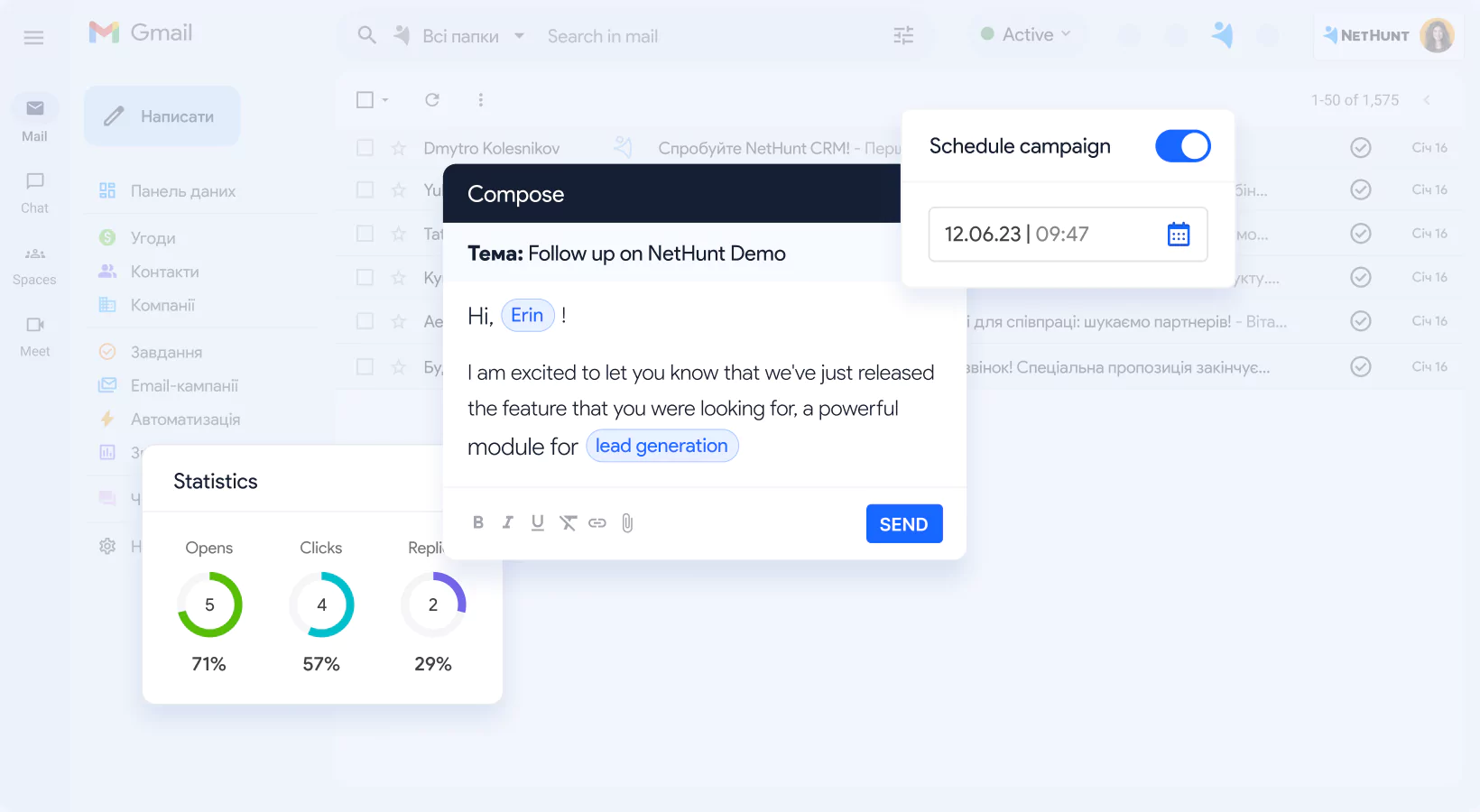
That is the real difference between NetHunt and Inbox Zero. Inbox Zero helps you survive the inbox. NetHunt helps you run a workflow through the inbox.
3) ConvertMate — best niche pick for outreach-email productivity
ConvertMate is the hardest tool on this page to place cleanly, so it is worth being blunt. It is not a day-to-day inbox assistant. And it is not a Gmail CRM. Its more relevant fit here is outreach-email productivity for teams doing structured campaigns tied to SEO and AI visibility.
Best for: marketing teams or operators running outreach-heavy workflows where the email work is part of a larger campaign, not just one-to-one inbox handling.
Why it stands out: it focuses on the machinery around outreach—finding sources, enriching contacts, generating personalized email sequences, and following up at scale. That is a real email workflow, just not the same one most people mean when they say “inbox productivity.”
Who should skip it: almost anyone looking for help managing daily inbox overload. ConvertMate only starts to make sense if your email productivity problem is specifically campaign outreach and you want that system run more efficiently.
This sounds like a limitation. It is actually a clarity point. A niche tool does not need to be broader to be useful. It just needs to solve its own workflow well. The mistake would be treating ConvertMate like an inbox assistant when that is not what it is.
What actually saves time in email workflows
Email tools save time when they remove one repeated burden:
- sorting noise and surfacing what matters,
- drafting responses faster without starting from zero,
- keeping follow-up attached to the right contact or deal,
- automating structured outbound email work that would otherwise be manual.
What usually fails is the opposite pattern. People buy a broad “AI email” product when their real problem is CRM discipline. Or they buy a CRM when their real problem is raw inbox noise. Or they buy an outreach tool for a job that is mostly reply management. That mismatch is where the category creates more friction than speed.
That is also why this page is intentionally not packed with ten interchangeable picks. The value here is in the distinction, not in pretending everything with email automation belongs in the same bucket.
Who should skip these tools, or at least buy more slowly
- Skip or slow down if your email volume is still light and not genuinely repetitive yet.
- Skip or slow down if your real bottleneck is meetings, research, or task switching rather than email.
- Skip or slow down if you want one tool to clean your inbox, run CRM, manage outreach, and coordinate team workflows equally well.
- Skip or slow down if you are mostly attracted to AI convenience rather than a very specific email problem.
I would not call that a reason to avoid the category. It is a reason to buy more deliberately. Email software often looks more useful than it feels once the trial starts, and the gap usually comes from choosing the wrong layer of the workflow.
Practical limitations to keep in mind
- Inbox tools are not CRM systems. Inbox Zero helps with email drag, but it is not trying to manage deals and team-wide pipelines.
- CRM tools are not clean inbox assistants. NetHunt is powerful when email is part of a process, but it is more than many solo users need.
- Outreach tools are not general inbox tools. ConvertMate may improve campaign execution without helping your daily reply overload at all.
- More automation is not always better. If the workflow is still simple, another layer can create more overhead than value.
The better question is not “which tool does the most?” It is “which tool removes the most expensive email friction I repeat every week?” That is the one that tends to stick.
Fit summary: where I would start
- Start with Inbox Zero if your inbox is the problem.
- Start with NetHunt CRM if your follow-up process is the problem.
- Start with ConvertMate only if your outreach campaign workflow is the problem.
That is the practical shape of the decision. Inbox Zero is the easiest pick for daily email overload. NetHunt is the stronger pick when Gmail is really part of a CRM process. ConvertMate is the specialist pick when outbound email work sits inside a larger SEO and AI visibility campaign.
Best next step
If your goal is faster day-to-day inbox control, start with Inbox Zero. If your goal is keeping Gmail tied to relationships, reminders, campaigns, and deal flow, NetHunt CRM is the more natural lane. And if your problem is email outreach execution inside a marketing system, ConvertMate is the more honest specialist fit.
FAQ
What is the best AI tool for inbox productivity?
Inbox Zero is the clearest fit on this page for day-to-day inbox productivity because it focuses on sorting, labeling, drafting replies, and cutting down email noise.
What is the difference between Inbox Zero and NetHunt CRM?
Inbox Zero is built to reduce inbox drag directly. NetHunt CRM is built to run relationship and pipeline workflows inside Gmail. One cleans up email work. The other structures follow-up around contacts, deals, tasks, and campaigns.
Is ConvertMate an inbox management tool?
Not really. ConvertMate is better understood here as a niche outreach-email platform for campaign execution tied to SEO and AI visibility, not as a daily inbox assistant.
Should I choose an inbox assistant or a Gmail CRM?
Choose an inbox assistant if the pain is volume, triage, and reply overhead. Choose a Gmail CRM if the pain is follow-up discipline, contact context, reminders, and pipeline coordination.