
AI & Software → AI Productivity
Most AI productivity tool mistakes happen before the trial even starts. People usually do not buy the wrong brand first. They buy the wrong category first, then expect the product to fix a workflow it was never built for.
If you are trying to avoid AI productivity tool mistakes, the practical question is not “which tool is best?” It is “what kind of drag am I actually trying to remove?” Desktop friction, browser research, inbox overload, async team updates, and source-heavy learning all sound like productivity problems. They are. But they are not the same productivity problem.
That is why this page is not another broad roundup. It is a trust-building guide to the recurring buying errors people make when choosing AI productivity software. The examples here are intentionally concrete: Raycast, Merlin AI, Inbox Zero, Mindgrasp, and Geekbot all sit in the same sub hub, but they solve very different kinds of friction.
If you want the wider shortlist first, go to Best AI Productivity Tools. If you want the framework behind this page, read How to Choose an AI Productivity Tool. And if you want the line between assistants and chatbots clarified, use AI Productivity Tools vs AI Chatbots.
The short version
- Do not buy by the label “AI productivity.” Buy by workflow friction.
- Do not confuse a broad assistant with a workflow tool.
- Do not assume the widest feature list creates the best fit.
- Do not ignore the “who should skip this” question.
- Do not expect one tool to solve desktop speed, research, inbox cleanup, and async team coordination equally well.
Why people keep choosing the wrong AI productivity tool
The category sounds broader than it really is. That is the first trap. A lot of product pages imply that AI productivity is one giant layer you can drop on top of work and instantly move faster. Sometimes that is true for a narrow workflow. It is rarely true for all of them at once.
The better question is not “what can this tool do?” The better question is “where does this tool sit?” A launcher sits in one place. A browser assistant sits in another. An inbox assistant sits somewhere else. An async standup tool lives in a team coordination layer. A research tool lives closer to source material and understanding.
The product often is not the problem. The category mismatch is.
That sounds minor. It is not. Once you choose the wrong category, every later judgment gets distorted. A good tool feels underwhelming because you asked it to solve the wrong thing.
Mistake 1: Buying by label instead of by workflow
This is the biggest mistake on the list. People search for “AI productivity tool,” then choose whatever sounds broadest and most impressive. That feels sensible. It usually is not.
Raycast is productivity software, but it is not an inbox tool. Merlin AI is productive, but it is not really an async team workflow system. Mindgrasp can save time, but it is not a browser-first convenience layer. Geekbot improves productivity, but only if the real problem is update collection and async coordination.
What actually matters here is naming the friction correctly first. Is the drag coming from switching and acting? Reading and summarizing? Triaging email? Collecting team updates? Learning from long material? Until that is clear, the shortlist is mostly noise.
Mistake 2: Confusing a broad assistant with a workflow tool
This is where a lot of people get impressed too early. Broad assistants feel useful quickly because they can help in many small places. That makes them easy to like. It also makes them easy to overvalue.
Merlin AI is a good example. It makes sense when your work is heavily browser-based and you want a broad AI layer for summaries, quick questions, and lighter drafting. But that is different from a workflow tool like Inbox Zero, which is built around one repeated pain: sorting email, drafting replies, and cleaning up inbox drag. Those are not interchangeable decisions.
The obvious promise is that a broad assistant can cover everything. The more useful reality is narrower: it can cover many small jobs, but it may not solve the one expensive repeated job that is actually costing you time.
That is why “assistant vs workflow tool” is not a technical distinction. It is a buying filter.
Mistake 3: Choosing the broadest promise instead of the clearest fit
A common pattern here is that buyers assume a broad promise is safer. It sounds more flexible, so it feels like a lower-risk purchase. In practice, the opposite is often true.
The tools people keep are rarely the ones that sound broadest. They are the ones that remove one expensive drag cleanly enough that the habit sticks. Raycast often sticks when the bottleneck is desktop speed. Inbox Zero sticks when email is overwhelming. Geekbot sticks when teams waste time on recurring updates. Mindgrasp sticks when learning and synthesis are the actual burden.
The better question is not “what else can it do?” It is “would I still want this if it only solved the problem I am buying it for?” That sounds harsh. It is usually clarifying.
Mistake 4: Solving the wrong bottleneck
This one shows up everywhere. People buy a faster summarizer when the real problem is too many meetings. They buy a browser assistant when the real problem is inbox overload. They buy a desktop launcher when the real problem is scattered follow-up. They buy a study tool when the real problem is not understanding at all, but simply not having time to execute.
If I had to be blunt, this is where good tools start to look mediocre for unfair reasons. The better question is not whether the tool works. It is whether it works on the step that is actually expensive in your week.
- Use Raycast when friction comes from moving through apps, commands, and desktop actions.
- Use Merlin AI when friction comes from browser-side reading, quick research, and light synthesis.
- Use Inbox Zero when friction comes from triage, drafting, and reply overhead in email.
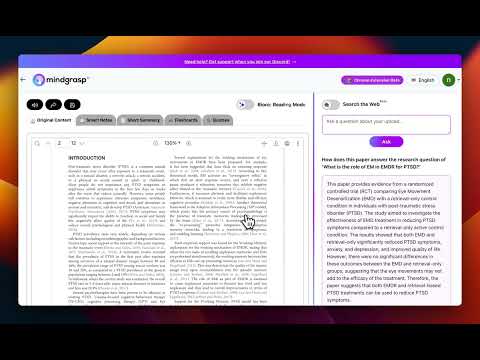
- Use Mindgrasp when friction comes from digesting long material into usable understanding.
- Use Geekbot when friction comes from collecting and sharing updates asynchronously.
That mapping is not glamorous. It is useful. And useful is what keeps subscriptions alive.
Mistake 5: Ignoring where the tool has to live
Environment fit matters more than many buyers expect. A launcher-centric tool has to live naturally in a desktop habit. A browser assistant has to live naturally in tabs. An inbox tool has to live naturally in the email workflow. A team update tool has to live naturally where the team already communicates.
This sounds good on paper, but the real difference shows up after the first week. If the tool asks you to leave your normal environment too often, adoption drops. The product may still be good. It just may not be good for the way you actually work.
That is why Raycast is often stronger for keyboard-heavy desktop users than for tab-heavy browser users. It is why Merlin feels easier for web-heavy workflows. It is why Geekbot makes more sense in Slack or Teams than as a separate side system. And it is why Inbox Zero works better when email is already central to the day.
Mistake 6: Treating AI chatbots and productivity tools as the same thing
This confusion is getting more common, not less. A chatbot can absolutely help with productivity. That does not mean it is the same as a productivity tool.
A chatbot is usually flexible and general. A productivity tool is usually narrower and more embedded. That difference matters because embedded tools often create less friction when the workflow repeats. Chatting your way through email cleanup, async updates, or repeated research steps is not always the cleanest route just because it is technically possible.
If this is the part you are still fuzzy on, read AI Productivity Tools vs AI Chatbots. That article goes deeper into the category boundary.
Mistake 7: Never asking who should skip the tool
This is one of the simplest filters and one of the least used. People are quick to ask what a tool is good for. They are slower to ask who it is not for.
That missing question creates a lot of waste. Raycast is not for everyone. Merlin is not for everyone. Inbox Zero is not for everyone. Geekbot is definitely not for everyone. That is not a weakness. It is usually a sign that the product has a real job.
The stronger the fit, the clearer the skip case tends to be. If the product page or review cannot tell you who should pass, trust should go down a little, not up.
Mistake 8: Underestimating setup friction and habit change
Some tools produce value quickly. Others only become worth it after a behavior shift. Both can be good. The mistake is pretending those are the same buying decision.
Merlin is easier to try with minimal workflow change. Raycast often rewards a stronger launcher habit. Geekbot only pays off if the team is willing to use async updates consistently. Mindgrasp pays off more when you actually feed it serious material and use the outputs as part of study or research. Inbox Zero sits somewhere in the middle because the pain is already present, but habit still matters.
This is where a lot of subscriptions quietly stop making sense. The product itself may be fine. The user simply was not ready for the level of structure or repetition it needed.
A cleaner way to choose the right tool
- Name the repeated drag first. Not the category name, the actual recurring annoyance.
- Choose the workflow layer second. Desktop, browser, inbox, team updates, or source-heavy learning.
- Choose the category third. Assistant, workflow tool, research tool, or async coordination tool.
- Choose the brand last. Brand comparison only gets useful after the first three calls are clear.
That order sounds less exciting than “best AI tools” content usually sounds. It is also how you avoid the most common buying mistakes.
If you want the decision flow in a more direct format, go next to How to Choose an AI Productivity Tool. If you want the broader shortlist again with workflow buckets, go back to Best AI Productivity Tools.
Who should slow down before buying anything
- People who still cannot name their main bottleneck clearly
- People who want one tool to solve every part of work at once
- People who are mostly attracted to AI novelty rather than repeated friction
- Teams hoping a tool will fix unclear process by itself
- Buyers who have not yet considered whether the tool fits their actual environment
I would not call that a reason to avoid the category. I would call it a reason to buy more deliberately. The expensive mistake is rarely missing the perfect tool. It is paying for the wrong kind of help.
Best next step
Start by getting the category right, then narrow into brands. The most useful next reads are the broad shortlist, the decision framework, and the chatbot-vs-productivity boundary piece.
FAQ
What is the biggest mistake when choosing an AI productivity tool?
The biggest mistake is choosing by the broad category label instead of the actual workflow problem. Most people buy the wrong kind of tool first, then judge the brand too harshly after that.
How do I know if I need an assistant or a workflow tool?
Choose an assistant if you want flexible help across many small tasks. Choose a workflow tool if you already know which repeated task you want to clean up, such as inbox triage, async standups, or source-heavy learning.
Why do good AI productivity tools still disappoint some buyers?
Usually because the product was asked to solve the wrong bottleneck. A good desktop tool can still feel weak if the real issue is email. A good browser assistant can still feel shallow if the real issue is team coordination.
Are AI productivity tools and AI chatbots the same thing?
No. A chatbot is usually broader and more flexible. A productivity tool is usually narrower and more embedded in a specific workflow. That is why a dedicated tool can feel less flashy but more useful over time.
Should I always choose the tool with the most features?
Usually no. The tool with the most features is often the tool with the blurriest fit. A narrower product that clearly removes one repeated pain is often the better long-term choice.
When should I slow down before buying an AI productivity tool?
Slow down when you still cannot name your main bottleneck, when the workflow is still simple, or when you are mostly buying because the category sounds exciting rather than because a repeated drag is genuinely expensive.