

Pixelcut vs Claid AI: Which One Fits Your Workflow?
If you are comparing Pixelcut vs Claid AI, the most useful answer is not “which one is better?” It is “better for what?” These tools overlap just enough to create confusion, but they are not really built around the same center of gravity.
Table of Contents
Pixelcut, now under the Pixa brand, is broader. It is built for fast editing, cleanup, background work, upscaling, generative changes, and batch image workflows across many kinds of visuals. Claid AI is narrower, but more focused. It is built around ecommerce and product photography workflows: better product shots, cleaner listings, realistic backgrounds, lighting fixes, AI photoshoots, and scalable image operations.
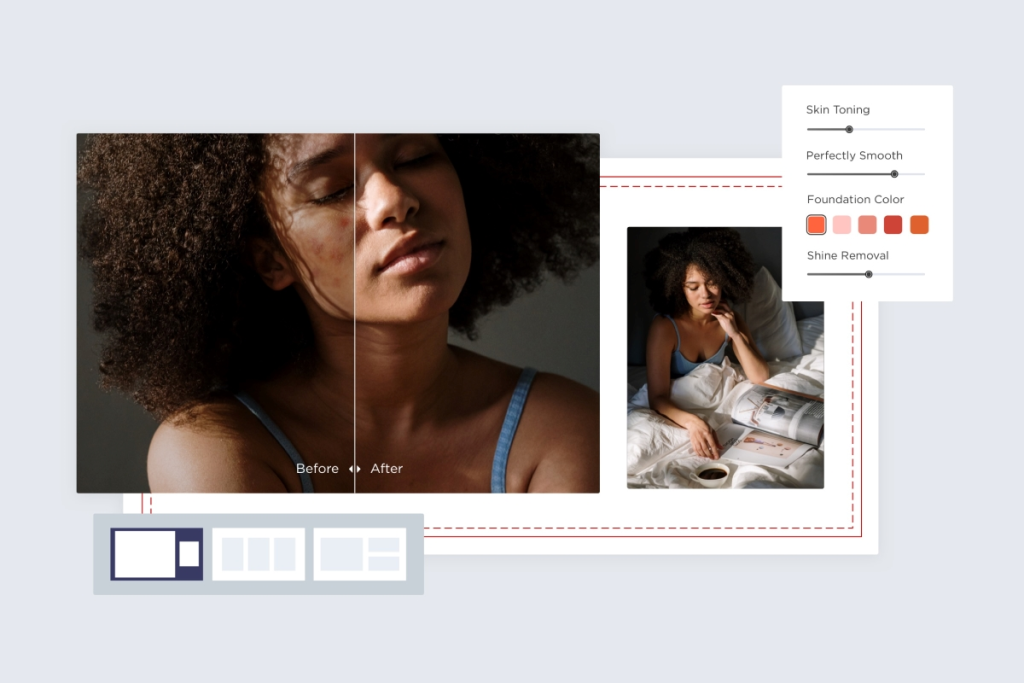
The practical question is this: are you mostly cleaning and improving existing visuals, or are you trying to build a more reliable product-photo workflow for ecommerce? That is the real fork in the road. If you want the wider category context first, start with the AI Design hub. If you want the broader shortlist, read Best AI Design Tools.
Quick verdict
- Choose Pixelcut if your work is broader, faster, and editing-first.
- Choose Claid AI if your workflow is specifically about ecommerce product visuals.
- Pixelcut is better for: quick cleanup, general asset editing, batch work, and flexible visual tasks.
- Claid AI is better for: product-photo quality, retail-ready imagery, seller onboarding, and product-focused automation.
- Skip Pixelcut if your bottleneck is not editing speed but product-photography consistency at scale.
- Skip Claid AI if you mostly need lighter everyday cleanup and do not run a product image workflow.
If I had to simplify it further, Pixelcut is the easier general recommendation, while Claid AI is the stronger specialist recommendation. That difference matters more than a long feature checklist.

What Pixelcut and Claid AI are actually trying to do
On paper, both tools can improve product images. That is why buyers compare them. In practice, their default workflows feel different.

Pixelcut is trying to make visual editing feel fast and low-friction. That includes background removal, upscaling, retouching, expand, shadows, batch editing, and more recent AI generation features inside a broader creative workspace. It is a flexible editing environment first, even though it can also help with ecommerce-style assets.
Claid AI is trying to make product photography look more like a repeatable system. It is built around product and fashion imagery, with AI Photoshoot, AI Fashion Models, background generation, background removal, upscale, color and light fixes, and API-friendly workflows. That is a narrower promise, but it is also a clearer one.
This sounds like a small distinction. It is not. A common pattern here is that people compare tools by overlapping features instead of by the job each tool is built to own. That is how a decent decision turns into a wrong subscription.
The core difference: general visual editing vs product-photo workflow
Pixelcut wins when your work is varied. Maybe you edit product photos one day, social images the next, thumbnails after that, and marketplace assets in between. In that kind of workflow, flexibility has real value.
Claid AI wins when your work is not varied in that way. It becomes much more compelling when most of the job is product imagery: catalogs, listings, PDP visuals, campaign stills, brand-safe backgrounds, fashion/on-model outputs, and scalable photo enhancement.

The better question is not whether Pixelcut can make product photos look better. It can. The better question is whether product photography is the main job. If the answer is yes, Claid’s narrower focus starts to look less limiting and more useful.
Where Pixelcut is the better fit

Pixelcut is the better choice when you need an editing-first tool that does a lot of common visual tasks well without forcing you into an ecommerce-specific workflow.
- You work from existing assets. Product photo, creator shot, thumbnail, portrait, listing image, social visual—it all starts with something you already have.
- You care about speed. Background removal, retouching, shadows, upscale, expand, and batch editing are useful because they solve repeated friction fast.
- Your workflow is mixed. You are not only doing ecommerce catalogs. You are editing many kinds of visuals across channels.
- You want batch operations. Pixelcut’s bulk editing and bulk background workflows make it easier to handle repeated edits across a larger set of images.
- You want a broader creative workspace. Pixelcut now sits inside the wider Pixa platform, which extends beyond a single narrow editing task.
What actually matters here is that Pixelcut is easier to keep using outside one specific use case. That makes it a safer recommendation for creators, small shops, resellers, solo operators, and marketers who need an everyday editing tool more than a product-photo system.
For neutral context, see Pixelcut. If fast editing and cleanup are the priority, Check Pixelcut.
Where Claid AI is the better fit
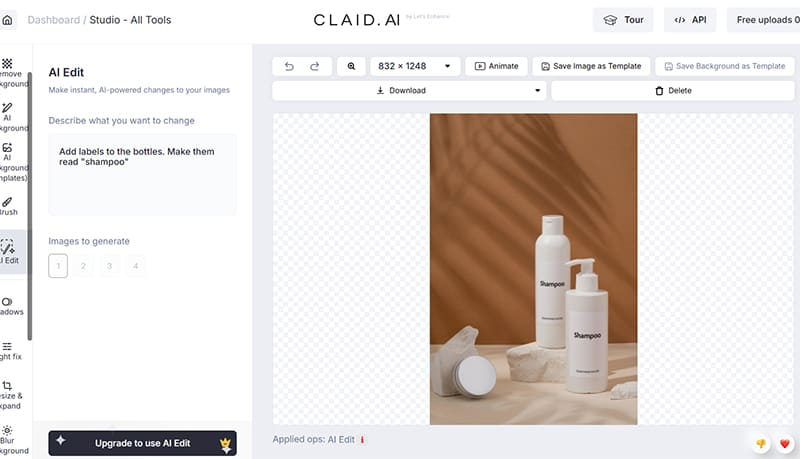
Claid AI is the better choice when your visual workflow is really about ecommerce photography quality, consistency, and repeatability—not just cleanup.
- You run product-photo workflows. Listings, catalogs, marketplaces, PDPs, and campaign-ready product visuals are the real job.
- You need product-specific realism. Claid pushes hard on preserving textures, logos, shapes, lighting, and overall product integrity.
- You want AI photoshoots and on-model outputs. That is a much more central part of Claid’s positioning than it is for Pixelcut.
- You need more scalable operations. Claid’s web plans and API-oriented setup make more sense once product imagery becomes a business process, not a side task.
- You care about category specialization. Claid openly frames itself around product photography rather than trying to be a broad creative app.
This is where Claid stops looking “narrow” in a negative sense. Narrow is a strength when the workflow is clear. If you are updating large catalogs, onboarding seller content, building brand-consistent product scenes, or turning simple product shots into more polished commercial assets, Claid is easier to justify.
For neutral context, see Claid AI. If ecommerce imagery is the bottleneck, Open Claid AI.
Feature comparison: where they overlap and where they do not
Background removal
Both tools do this, so the difference is not feature presence. It is context. Pixelcut treats background removal as part of a broader editing stack. Claid treats it as one piece of a product-photo pipeline. If your goal is general-purpose cleanup, Pixelcut feels more natural. If your goal is consistent, commerce-ready output, Claid has the stronger surrounding workflow.
Upscaling and enhancement
Again, both have this. Pixelcut’s enhancement tools fit users who want quick visual improvement without overthinking the process. Claid’s enhancement tools make more sense when product detail, clarity, and professional presentation are business-critical.
Generated product scenes
This is where Claid has the cleaner angle. Pixelcut can help you create AI product photos and generated backgrounds, but Claid’s core positioning is much more tightly wrapped around AI photoshoots, fashion models, and retail-ready product scenes.
Batch work and bulk operations
Pixelcut is stronger here for users who want broad batch editing in a more general sense. Claid matters more when those operations sit inside a specific ecommerce or marketplace image workflow. So even here, the question is not just scale. It is what kind of scale you actually need.
Workflow breadth
Pixelcut is wider. Claid is more opinionated. That means Pixelcut is usually easier to recommend early, while Claid is easier to recommend once the use case is already clear.
Pricing logic: which one feels easier to try?
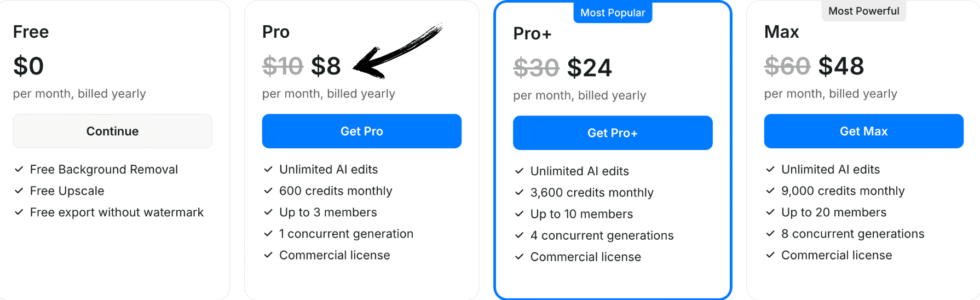
Pixelcut feels easier to approach if you want a general free entry point and then a Pro upgrade once you need more AI tools, HD exports, and higher-volume use. Its pricing logic makes sense for users who want to get started with basic editing, then expand usage over time.
Claid also has a free path, but it is framed more like a structured trial into a product-photo workflow. You get credits and trial images, then the platform becomes more clearly commercial as you move into higher-usage or business needs.
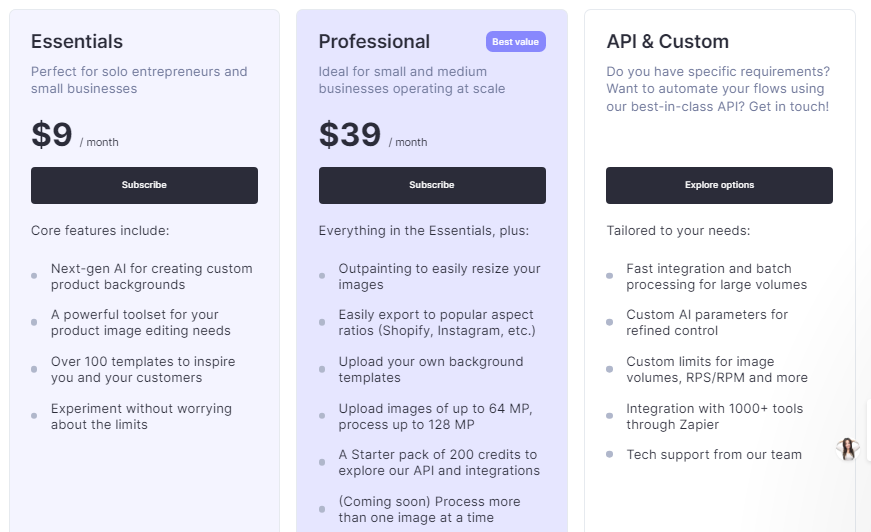
This sounds good on paper, but the better question is what kind of trial you need. Pixelcut is easier to “grow into” if you are still figuring out your workflow. Claid is easier to evaluate if you already know you need product-photo tooling and want to test whether the outputs justify the category.
Ease of use: which one is easier day to day?
Pixelcut is easier for a broader group of users. That is one of its biggest strengths. The workflow is generally obvious: upload, remove the background, fix what needs fixing, add a shadow, upscale, export, move on.
Claid is still approachable, but it makes the most sense when the user already understands why they are working inside a product-photo workflow. It is less about casual editing and more about achieving a certain kind of image output repeatedly. That makes it feel more purposeful, but also slightly narrower in day-to-day appeal.
If you are choosing for a solo operator or creator who wants quick wins, Pixelcut is usually the easier starting point. If you are choosing for a seller, brand, or team whose success depends on product visuals looking consistently more polished, Claid becomes easier to defend.
Who should choose Pixelcut?
- Creators and small businesses editing many kinds of visuals
- Marketplace sellers who want fast cleanup, shadows, and better-looking images without a heavy system
- Teams that value batch editing and general-purpose flexibility
- Users who want an easier, broader recommendation without overcommitting to an ecommerce-only workflow
Pixelcut is the cleaner choice when workflow flexibility matters more than specialization.
Who should choose Claid AI?
- Ecommerce operators and brands focused on product-photo quality
- Teams building catalog, PDP, and campaign visuals from simple product shots
- Businesses that care about consistent backgrounds, realistic scenes, and product-detail preservation
- Users who want a more dedicated product photography tool, not just another image editor
Claid is the stronger choice when your “design” problem is really a commerce photography problem.
Who should skip each tool?
Skip Pixelcut if you already know the real need is studio-like product imagery, ecommerce consistency, and product-photo workflows that go beyond cleanup. It can help, but that is not the sharpest version of its value.
Skip Claid AI if your editing needs are lighter, more varied, and not heavily centered on product photography. Claid is better when the use case is clearer. Without that clarity, it can feel like more specialization than you need.
Final verdict: Pixelcut or Claid AI?
Pixelcut is the better buy for more people. Claid AI is the better buy for the right people.
That is the real answer. Pixelcut is easier to recommend if you want a broader editing tool that can handle product work, cleanup, batch edits, and general visual tasks without forcing you into a narrow category. Claid is better if ecommerce product visuals are central enough that a dedicated photo workflow actually earns its place.
The soft human verdict is this: choose Pixelcut when the workflow is still mixed. Choose Claid when the workflow is already clear.
Best-fit summary
- Best for quick cleanup and flexible editing: Pixelcut
- Best for ecommerce product-photo workflows: Claid AI
- Best for broader everyday use: Pixelcut
- Best for product-focused specialists: Claid AI
If you want the cleaner next step for general editing work, See Pixelcut. If your bottleneck is product imagery, See current options for Claid AI.
FAQ
Is Pixelcut better than Claid AI?
Pixelcut is better for broader editing-first workflows. Claid AI is better for ecommerce product-photo workflows. The better choice depends on what kind of work repeats most often.
Is Claid AI worth it for small ecommerce stores?
It can be, especially if product-photo quality affects listings, ads, and catalog performance often enough to justify a dedicated workflow. If you only need occasional cleanup, it may be more specialized than necessary.
Can Pixelcut handle ecommerce product photos too?
Yes. Pixelcut can absolutely help with product imagery, backgrounds, shadows, and AI-generated product photos. The question is whether you need flexible editing or a more dedicated ecommerce photo system.
Which tool is easier for beginners?
Pixelcut is usually easier for beginners because the editing workflow is more general and easier to understand quickly. Claid becomes easier once the user already knows they need product-photo workflows.
What should I read next after this comparison?
Read Best AI Design Tools for the wider shortlist, or Best AI Design Tools for Ecommerce Product Images if your decision is mostly about product visuals and listings.
Still narrowing the category? Go next to Best AI Design Tools for Ecommerce Product Images or back to Best AI Design Tools.
PromoCodeRadar helps users find cleaner coupon codes, official deals, annual billing savings, free trials, and better ways to save on software, AI tools, and online services.
If you found a broken code or outdated listing, contact us at contact@promocoderadar.com.