

AI & Software → AI Productivity
The best AI assistants for everyday browser workflows are the ones that make normal tab-heavy work feel lighter. That usually means faster reading, quicker answers, easier summarizing, cleaner follow-up, and less context loss between search, articles, PDFs, and AI chats.
Table of Contents
If you are searching for best AI assistants for everyday browser workflows, the real question is not which assistant has the longest feature list. It is which one helps you move through daily browsing without creating a second workflow to manage.

This category looks simple from a distance, but it splits fast. Some tools are built for quick browser help while you read. Some are better when the browsing work needs to become saved research you can come back to later. And some are not really page-side assistants at all. They are workflow organizers for people whose browser life already revolves around ChatGPT.
That is why this page stays narrow and practical. Merlin AI is the strongest all-around fit for everyday browser assistance. Sider AI is better when everyday browsing starts turning into repeated research and reusable context. Superpower is the sharper pick when your actual browser workflow already lives inside ChatGPT and the real pain is conversation sprawl, prompt clutter, and retrieval.
If you want the broader shortlist first, go to Best AI Productivity Tools. If you want the wider desktop-plus-browser lane, read Best AI Productivity Tools for Desktop and Browser Workflows. And if you want the tighter three-way comparison, jump to Raycast vs Merlin AI vs Sider AI.
Quick picks
- Best overall for everyday browser use: Merlin AI
- Best for everyday browsing plus saved research: Sider AI
- Best for ChatGPT-heavy browser workflows: Superpower
The short version: choose Merlin if you want the easiest broad browser helper, choose Sider if you want everyday browsing to leave behind reusable knowledge, and choose Superpower if your real browser assistant is already ChatGPT but the interface needs more structure.
What everyday browser workflows actually look like

“Everyday browser workflows” sounds broad, but for most people it means the same handful of repeated actions:
- reading articles and long pages faster,
- asking questions about what is on screen,
- summarizing PDFs, docs, or videos without copying everything into another tool,
- drafting quick emails, posts, or notes while browsing,
- keeping enough context that useful things do not disappear after the tab closes.
This is where the category gets more useful once you stop treating it like one generic assistant market. Some tools help you during the page-level moment. Some help you after that moment by saving the useful parts. Some help organize the separate AI conversations that your browsing triggers all day.
The better question is not “which browser AI is smartest?” It is “where does my normal tab-based work keep getting slower than it should?”
How to choose the right browser assistant
Use this faster filter before you choose:
- You want one broad assistant while browsing websites, search, PDFs, and docs: start with Merlin AI.
- You want browsing help plus a place to keep sources, clips, and reusable findings: start with Sider AI.
- You already rely on ChatGPT every day and the real problem is organizing conversations and prompts: start with Superpower.
This sounds almost too simple, but it is where most bad picks happen. People buy a research-memory tool when they only need quick help on the page. Or they buy a general browser helper when the real issue is that their ChatGPT workflow has become messy and hard to retrieve from.
The better question is not “what else can it do?” It is “what kind of browser friction do I repeat most days?”
Best AI assistants for everyday browser workflows by fit
These are the three mapped tools I would shortlist first, with the differences kept practical instead of blurred together.
1) Merlin AI — best overall for everyday browser workflows
Merlin AI is the easiest overall pick when your browser workflow is a mix of ordinary tasks rather than one specialized research system. It works best for people who spend the day moving between pages, articles, search results, PDFs, docs, and quick writing moments and want one assistant layer that can summarize, answer, and help without forcing a lot of structure up front.
Best for: people who live in tabs and want a broad, low-friction browser helper for reading, asking, summarizing, and drafting.
Why it stands out: it starts being useful quickly. That matters more than people admit. A lot of browser assistants sound powerful, but everyday workflows reward the tool that is easiest to actually keep using. Merlin makes the strongest case when the job is not deep research architecture. It is everyday speed.
Who should skip it: people who already know they need stronger saved context, deeper research memory, or a more organized ChatGPT operating layer. Merlin is broad and helpful. That is also where its limits begin for heavier users.
This is the kind of tool that makes sense for someone who wants help on a normal Tuesday, not just during a big research project.
2) Sider AI — best for everyday browsing that turns into reusable knowledge

Sider AI overlaps with Merlin at first, but it becomes more compelling once the browsing work needs memory. If your everyday workflow includes articles, search, docs, PDFs, highlights, and repeated follow-up questions, Sider starts to feel stronger because it gives that activity a place to accumulate rather than vanish.
Best for: knowledge workers, researchers, analysts, and browser-heavy users who want everyday assistance plus a reusable layer of saved context.
Why it stands out: the help does not have to disappear after the page is gone. That is the real difference. A lot of everyday browser assistants help you now. Sider is more useful when “now” needs to become “later too.”
Who should skip it: people who just want the lightest, quickest helper and do not care much about storing clips, sources, or reusable research. If that is the situation, Merlin often feels easier.
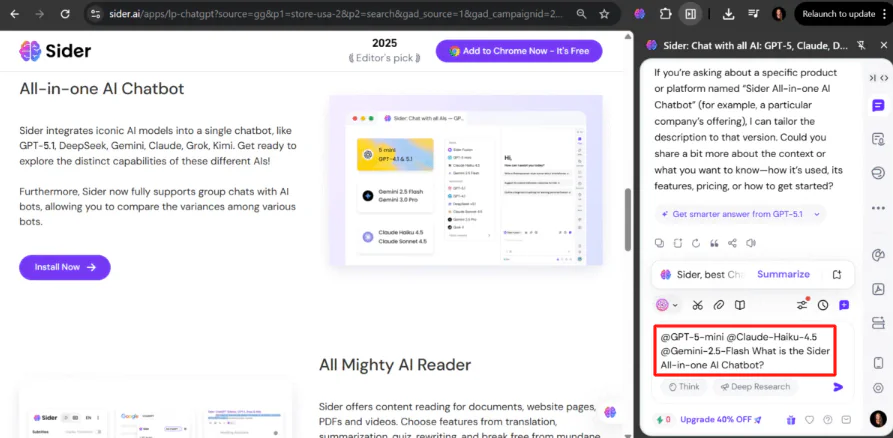
If your decision is really between the broader browser-and-desktop lane, this is the cleaner next read: Raycast vs Merlin AI vs Sider AI.
3) ChatGPT with Superpowers — best for ChatGPT-heavy everyday browser workflows
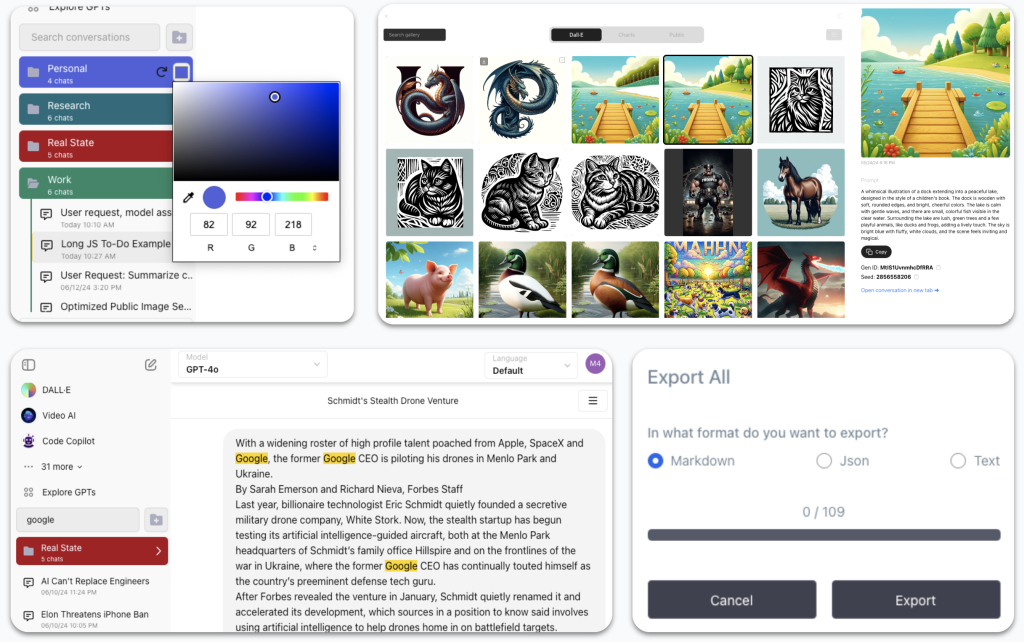
Superpower is the most different tool in this group, which is exactly why it deserves its own lane. It is not trying to be another side-panel AI assistant for any webpage. It is much better understood as a workflow organizer for people whose browser life already runs through ChatGPT every day.
Best for: users who already use ChatGPT heavily in the browser and need folders, search, prompt management, notes, exports, and cleaner retrieval across many conversations.
Why it stands out: it solves the mess that appears after AI use becomes normal. Once you are juggling many prompts, threads, partial drafts, image generations, and references, the bottleneck is no longer “I need an assistant.” It becomes “I need structure.” Superpower is stronger there than a general page assistant.
Who should skip it: people who are not already ChatGPT-heavy. If ChatGPT is only an occasional tab, Superpower can feel like solving a problem that has not fully arrived yet.
I would not call this the broadest browser tool. I would call it one of the more honest ones. It improves everyday browser work only if that everyday work already includes lots of ChatGPT.
What actually saves time in everyday browser work
These tools save time when they remove one repeated burden:
- reading long pages just to find the one useful section,
- re-asking the same question across different pages and files,
- losing useful findings because nothing gets saved in a reusable way,
- digging through old ChatGPT conversations because the interface no longer scales.
What usually fails is the opposite pattern. People buy a heavy research-memory tool when they only need a quick page summary. Or they buy a light assistant when their real issue is that they keep losing past work. Or they buy a ChatGPT organizer before ChatGPT is actually central enough to justify it.
The anti-hype version is simple: a browser assistant saves time when it reduces repeated tab friction without asking for a whole new system in return.
Who should skip these tools, or at least buy more slowly
- Skip or slow down if your main bottleneck is actually desktop work, not browser work.
- Skip or slow down if you still cannot tell whether you need quick help, saved research, or ChatGPT organization.
- Skip or slow down if your workflow is still simple enough that manual browsing habits are genuinely fine.
- Skip or slow down if you want one tool to handle every browser task equally well without trade-offs.
I would not call that a reason to avoid the category. I would call it a reason to narrow the job first. Everyday tools work best when the everyday pain is clear.
Practical limitations to keep in mind
- Merlin is broad by design. That makes it easy to start with, but not always the deepest long-term system.
- Sider is more useful when saved context matters. If that does not matter, some of the structure may feel unnecessary.
- Superpower is not a generic browser assistant. It is much stronger once ChatGPT is already part of daily work.
- None of these tools fixes weak prioritization. Faster browsing still does not decide what matters for you.
The better question is not “which one does the most?” It is “which one removes the most repeated browser friction in the way I already work?” That is where the answer usually gets clearer.
Fit summary: where I would start
- Start with Merlin AI if the job is broad everyday browser help.
- Start with Sider AI if the job is everyday browser help plus saved knowledge.
- Start with Superpower if the job is keeping ChatGPT-based browser work organized and retrievable.
That is the honest shape of the decision. There is no universal winner here. There is only the best fit for the kind of browser work you repeat most days.
Best next step
If you want the broadest everyday helper, start with Merlin AI. If you want more memory and reusable browsing context, Sider is the better lane. If your browser work already lives in ChatGPT, Superpower is the cleaner specialist fit.
FAQ
What is the best AI assistant for everyday browser workflows?
There is not one universal answer. Merlin AI is the strongest all-around fit for everyday browser help, Sider AI is stronger when you want saved research and reusable context, and Superpower is better when your browser workflow already depends heavily on ChatGPT.
Should I choose Merlin AI or Sider AI?
Choose Merlin AI if you want the easiest broad browser assistant for daily reading, summarizing, and quick help. Choose Sider AI if you also want the work to become reusable through saved context, clips, and research memory.
Is Superpower the same kind of tool as Merlin or Sider?
Not really. Superpower is less of a page-side browser assistant and more of a workflow organizer for ChatGPT-heavy users. It helps more with chat management, retrieval, folders, prompts, and structure than with general on-page browsing tasks.
When does Sider make more sense than Merlin for everyday work?
Sider makes more sense when everyday browsing is not disposable. If you repeatedly revisit sources, save highlights, compare answers, and want the material to stay useful later, Sider’s structure is more valuable.
Who should use Superpower for browser productivity?
People who already do a lot of real work in ChatGPT. If your browser workflow constantly turns into long conversation history, repeated prompts, exports, and old threads you need to find again, Superpower becomes much more relevant.
When do everyday browser assistants actually save time?
They save time when they reduce repeated page-level friction like rereading, re-asking, resummarizing, or losing useful context. They save much less time when the workflow is still simple or when the tool asks for more structure than the job really needs.